
Initiating an Emergency Request
1. Press the cover briefly to open it.
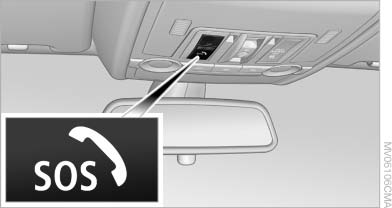
Initiating an Emergency Request
2. Press the SOS button until the LED in the button lights up.
▷ The LED lights up: an Emergency Request
was initiated.
If the circumstances allow this, remain in the
vehicle until the connection has been established.
▷ The LED flashes if the connection to the
BMW Assist Response Center has been established.
Once the BMW Assist Response Center has
received your Emergency Request, the
BMW Assist Response Center contacts you
and takes further steps to help you.
Even if you are unable to respond, the BMW
Assist Response Center can take further
steps to help you under certain circumstances.
For this purpose, data that are used to determine
the necessary rescue measures,
such as the current position of the vehicle if
it can be established, are transmitted to the
BMW Assist Response Center.
▷ If the LED is flashing but the BMW Assist Response Center cannot be heard on the hands-free system, the hands-free system may be malfunctioning. However, the BMW Assist Response Center may still be able to hear you.
Initiating an Emergency Request automatically
Under certain conditions, an Emergency Request is automatically initiated immediately after a severe accident. Automatic Collision Notification is not affected by pressing the SOS button.
See also:
Storing
1. Switch on the ignition.
2. Set the desired position.
3. Press the button. The LED in the
button lights up.
4. Press the desired button 1 or 2. The LED
goes out.
If the M button is pressed ...
Adjusting electrically
Adjusting electrically
1. Forward/backward
2. Height
3. Seat tilt
Backrest
4. Backrest
Differs depending on seat:
Differs depending on seat
1. Backrest
2. Height
Additional depending o ...
Fuel tank capacity
Gasoline engine Fuel tank capacity: approx.
21.6 US gal/82 liters.
Refuel promptly
Refuel below a range of 30 miles/50 km;
otherwise, engine functions are not ensured and
damage may occur. ...