
Starting Roadside Assistance with BMW Assist or TeleService
General information
In vehicles equipped with TeleService, support is first offered by TeleService Diagnosis and then, if necessary, by TeleService Help.
1. "BMW Assist" or "ConnectedDrive"
2. "Roadside Assistance"
3. "Start service"
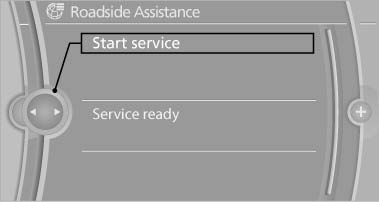
Starting Roadside Assistance with
BMW Assist or TeleService
TeleService Diagnosis
TeleService Diagnosis enables the wireless transmission of detailed vehicle data that are important for vehicle diagnosis. These data are transmitted automatically.
After the data are transmitted, the voice connection to Roadside Assistance is re-established.
TeleService Help
TeleService Help enables an in-depth diagnosis of the vehicle by Roadside Assistance via wireless transmission.
TeleService Help can be started after a prompt by Roadside Assistance and the termination of the voice connection.
Starting TeleService Help
1. Park the vehicle in a safe place.
2. Set the parking brake.
3. The ignition is switched on.
4. "TeleService Help"
After completion of TeleService Help, a voice connection is established to Roadside Assistance.
See also:
General information
Instructions for voice activation system, refer to
page 22.
To have the available spoken instructions read
out loud: ›Voice commands‹ ...
Radio Data System RDS
In the FM waveband, additional information is transmitted via RDS. If the reception
conditions are good, the station names are shown on the Control Display. Where reception
is poor or in the event ...
Resuming the original route
If the route section should no longer be bypassed:
1. "Navigation"
2. "Route information"
3. "New route for:"
4. "Remove blocking" ...