
New contact
1. "Contacts"
2. "New contact"
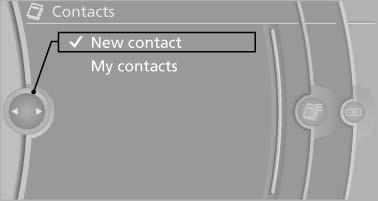
New contact
3. The entry fields are still filled with the previous
entries: "Delete input fields"
4. Fill in the entry fields: select the symbol next
to the entry field.
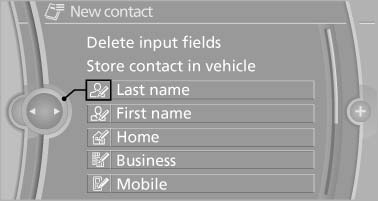
Fill in the entry fields: select the symbol next
to the entry field
5. Enter the text
In vehicles equipped with a navigation system:
it is only possible to enter addresses
that are contained in the vehicle navigation
data. This ensures that destination guidance
is possible for all addresses.
6. If necessary, "Store".
7. "Store contact in vehicle"
See also:
Climate control windshield
Climate control windshield
The marked area is not covered with heat reflective
coating.
Use this area for garage door openers, devices
for electronic toll collection, etc. ...
Vehicle equipment
All standard, country-specific and optional
equipment that is offered in the model series is
described in this chapter. Therefore, equipment
is also described that is not available in a vehicle, ...
First aid kit
The first aid kit is located behind the left-hand
cover in the cargo area.
Some of the articles have a limited service life.
Check the expiration dates of the contents regularly
and replace ...