
Message from the Concierge service
Starting destination guidance
1. Select the desired message
2.  "Start
guidance" or "Add as another
destination"
"Start
guidance" or "Add as another
destination"
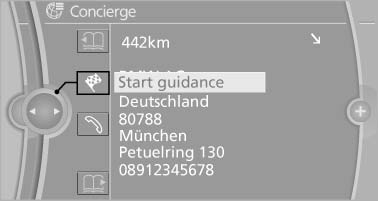
Message from the Concierge service
3. Start destination guidance, if necessary.
Dialing the number in the message
Up to 4 phone numbers can be transmitted with a message.
1. Select the desired message.
2.  "Call":
If the message contains a number, the connection is established.
 "Select phone number":
If the message contains more than one number, select the desired number from the list.
The connection is established.
Storing an address
1. Select the desired message.
2. Open "Options".
3. "Store contact in vehicle"
Displaying additional information
1. Select the desired message.
2. "Further information"
See also:
Messages
General informationThe displaying of text messages and emailsfrom the mobile phone depends
on whether the mobile phone supports transmission into the vehicle from the mobile
phone. Text messages a ...
Automatic deactivation of the front passenger airbags
The system determines whether the front passenger
seat is occupied by measuring the resistance
of the human body.
The front, knee, and side airbag on the front
passenger side are activated or d ...
BMW 328i: new four-cylinder petrol engine with TwinPower Turbo technology
sets a new benchmark for driving dynamics and efficiency
With the launch of the new sports sedan, a brand-new four-cylinder engine
will make its debut in the BMW 3-Series. In keeping with the dynamic overall
theme of the new BMW sports sedan, this new-g ...