
Filtering the message list
The message list can be filtered, when more than one type of message exists.
1. "Filter:"
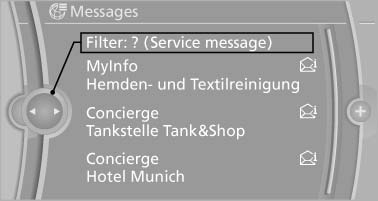
2. Select the type of message.
▷ "All"
All messages are displayed.
▷ "E-mail"
Only e-mails from the mobile phone are
displayed.
▷ "Service message"
Only messages from the BMW Assist
Concierge service and My Info are displayed.
▷ "Text message"
Only text messages from the mobile
phone are displayed.
See also:
Selecting a destination from the
address book
1. "Navigation"
2. "Address book"
Contacts with addresses are displayed if
these have been checked as destinations.
If the contacts with addresses from the mobile
phone are ...
Operating concept
Various functions can be called up by pressing
the control button with a pointed object, such as
the tip of a ballpoint pen or similar object. The
following setting options are displayed in succ ...
Notes
One person per safety belt
Never allow more than one person to wear
a single safety belt. Never allow infants or small
children to ride on a passenger's lap.◀
Putting on the belt
Lay ...