
Managing music
Albums
Renaming an album
The name of the album, if available, is automatically entered when the album is stored. If the name is not available, it can be changed later if desired.
1. "CD/Multimedia"
2. "Music collection"
3. Highlight the desired album.
4. Open "Options".
5. "Rename album"
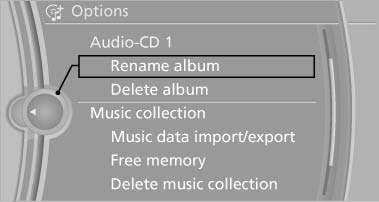
Rename album
6. Select the letters individually.
Deleting an album
An album cannot be deleted while a track from that album is being played.
1. "CD/Multimedia"
2. "Music collection"
3. Highlight the desired album.
4. Open "Options".
5. "Delete album"
Deleting a track and directory
A track cannot be deleted while it is being played.
A directory cannot be deleted while a track from that directory is being played.
1. "CD/Multimedia"
2. "Music collection"
3. Highlight the directory or track.
4. Open "Options".
5. "Delete folder" or "Delete track"
Free memory capacity
Display the free memory capacity in the music collection.
1. "CD/Multimedia"
2. "Music collection"
3. Open "Options".
4. "Free memory"
Music collection
Backing up the music collection
The entire music collection can be stored on a USB device. Make sure there is enough free memory capacity on the USB device.
Depending on the number of tracks, backing up the music collection may take several hours.
Therefore, it is best to perform the backup during a long trip.
1. Starting the engine.
2. Connect the USB device to the USB interface in the glove compartment
3. "CD/Multimedia"
4. "Music collection"
5. Open "Options".
6. "Music data import/export"
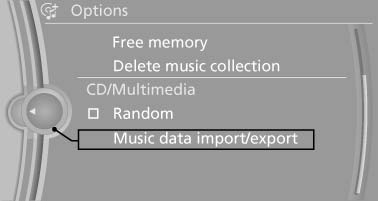
Music data import/export
7. "Backup music on USB"
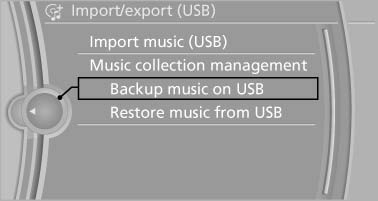
Backup music on USB
Storing the music collection in the vehicle
When storing from the USB device, the existing music collection in the vehicle is replaced.
1. "CD/Multimedia"
2. "Music collection"
3. Open "Options".
4. "Music data import/export"
5. "Restore music from USB"
Deleting the music collection
1. "CD/Multimedia"
2. "Music collection"
3. Open "Options".
4. "Delete music collection"
See also:
Tow-starting and towing
Transporting your vehicle
Note
Your vehicle is not permitted to be towed.
Therefore, contact a service center in the event
of a breakdown.
Do not have the vehicle towed
Have your vehicle tran ...
Tailormade driving dynamics
The latest generation BMW 7-Series is the first to have Dynamic Driving
Control featuring Dynamic Damping Control as standard. Dynamic Driving Control
is the umbrella function that lets a driver c ...
Setting the voice dialog
You can set whether the system uses the standard dialog or a short version.
In the short version of the voice dialog, the responses from the system are given
in abbreviated form.
On the Control Di ...