
Video playback
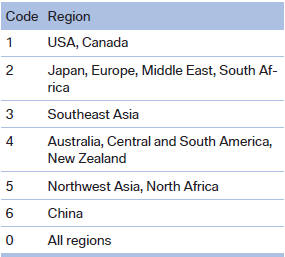
Country codes
Playback
The video image is displayed on the Control Display up to a speed of approx. 2 mph/3 km/h; in some countries, it is only displayed while the parking brake is set or the automatic transmission is in position P.
DVD video
1. "CD/Multimedia"
2. "CD/DVD"
3. Select a DVD with video content.
4.  "DVD menu"
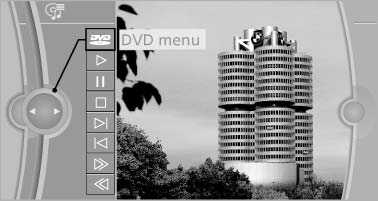
"DVD menu
5. Start the DVD via the DVD menu.
VCD/SVCD
1. "CD/Multimedia"
2. "CD/DVD"
3. Select a CD with video content.
4.  "Select track"
5. Select the desired track.
Video menu
To open the video menu: turn the controller during playback.
Press the controller when "Back" is displayed.
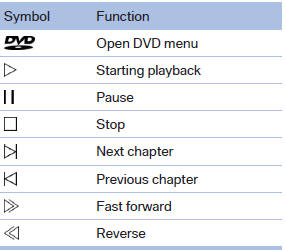
In fast forward/reverse: the speed increases every time the controller is pressed. To stop, start playback.
DVD menu
1. If necessary, turn the controller to open the video menu.
2.  "DVD menu"
The DVD menu is displayed. The display depends
on the contents of the DVD.
3. To select menu items: move the controller and press it.
To change to the video menu: turn the controller and press it.
DVD/VCD settings
For some DVDs, settings can only be made via the DVD menu; refer also to the information on the DVD.
Selecting the language
The languages that are available depend on the DVD.
1. Turn the controller during playback.
2. Open "Options".
3. "Audio/language"
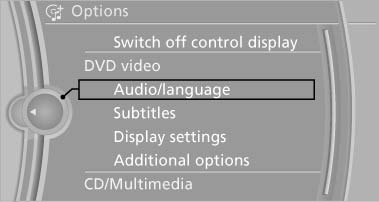
Audio/language
4. Select the desired language.
Selecting the subtitles
The subtitles that are available depend on the DVD.
1. Turn the controller during playback.
2. Open "Options".
3. "Subtitles"
4. Select the desired language or "Do not display subtitles".
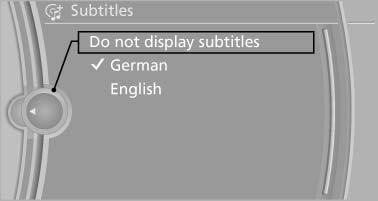
Do not
display subtitles
Setting the brightness, contrast and color
1. Turn the controller during playback.
2. Open "Options".
3. "Display settings"
4. "Brightness", "Contrast" or "Color"
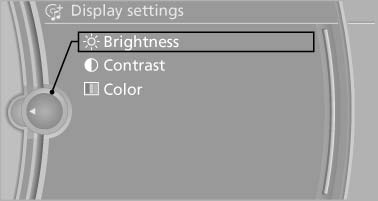
Brightness
5. Turn the controller until the desired setting is reached and press the controller.
Selecting the zoom
Display the video image on the entire screen.
1. Turn the controller during playback.
2. Open "Options".
3. "Additional options"
4. "Zoom mode"
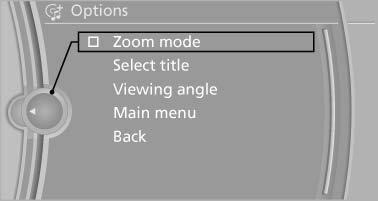
Zoom mode
Selecting a track
DVD video:
1. Turn the controller when the DVD menu is displayed.
2. Open "Options".
3. "Additional options"
4. "Select title"
5. Select the desired track.
VCD/SVCD:
1.  "Select track"
2. Select the desired track.
Selecting the camera angle
The availability of a different camera angle depends on the DVD and the current DVD track.
1. Turn the controller during playback.
2. Open "Options".
3. "Additional options"
4. "Viewing angle"
5. Select the desired camera angle.
Opening the main menu, back
These functions are not contained on every DVD. Therefore, they may not be available for use.
See also:
Brake force display
The concept
▷ During normal brake application, the outer
brake lamps light up.
▷ During heavy brake application, the inner
brake lamps light up in addition. ...
Two additional gears mean threefold progress: quicker shifts, greater
smoothness, enhanced efficiency.
The wider spread of ratios allows the engine to run at lower speeds, often in
the "tallest" gear, 8th. Yet even with this wider spread, the steps between
adjacent gears are reduced; in t ...
Entering an address using a command
1. Press the
button on the steering
wheel.
2. Enter address
3. Wait for a request from the system.
4. Say the address in the suggested order.
5. Continue making the entry as prompted by
the ...