
Stored stations
General information
It is possible to store up to 40 stations.
Calling up a station
1. "Radio"
2. "Presets"
3. Select the desired station.
Storing a station
The station currently selected is stored.
1. "Radio"
2. "Presets"
3. "Store station"
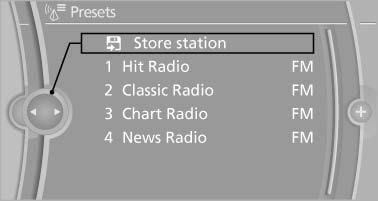
Store station
4. Select the desired memory location.
The list of stored stations is stored for the remote control currently in use.
The stations can also be stored on the programmable memory buttons
Deleting a station
1. "Radio"
2. "Presets"
3. Select the desired station.
4. Open "Options".
5. "Delete entry"
See also:
Closing the hood
Closing the hood
Drop the hood from a height of approx. 16 in/
40 cm. It must be clearly heard to engage.
Hood open when driving
If you see any signs that the hood is not
completely closed ...
Storage
Store wheels and tires in a cool, dry place with
as little exposure to light as possible.
Always protect tires against all contact with oil,
grease and fuels.
Do not exceed the maximum tire infl ...
Malfunction
A Check Control message is displayed.
The parking assistant failed. Have the system
checked. ...