
Traffic Jump
Traffic and weather information for a selected region is broadcast every few minutes.
Selecting a region
1. "Radio"
2. "Satellite radio"3. Open "Options".
4. "Set jump"
5. Select the desired region.
The region is stored for the remote control currently in use.
Activating/deactivating the jump
1. "Radio"
2. "Satellite radio"
3.  "Jump to:"
Information for the selected region is broadcast
as soon as it is available.
"Jump to:"
Information for the selected region is broadcast
as soon as it is available.
A new panel opens.
Canceling the Traffic Jump: "Cancel".
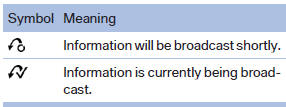
Select one of the symbols to deactivate Traffic Jump.
See also:
Lug bolt lock
The lug bolt lock is in the tool kit or in a storage
compartment close to the tool kit.
▷ Lug bolt, arrow 1.
▷ Adapter, arrow 2.
Removing
1. Attach the adapter to the wheel lug.
...
RDS
RDS broadcasts additional information, such as
the station name, in the FM wave band. When
playing a station with multiple frequencies, the
system automatically switches to the frequency
with ...
Volume
▷ "Speed volume": speed-dependent volume
control.
▷ "PDC": volume of the PDC signal compared
to the entertainment sound output.
▷ "Gong": volume o ...