
Storing favorites
Up to 30 favorites can be stored in the favorites list. Available favorites are artist, track, game, league, and team.
Storing the artist, track, or game
It is only possible to store favorites that are currently being broadcast. The channel information must be available.
1. "Radio"
2. "Satellite radio"
3. If necessary, open "All channels" or the desired category.
4. Select the desired channel.
5. Press the controller again.
6. Select the artist, track, or game.
Storing the league or team
Leagues or teams can be added to the favorites from a selection list.
1. "Radio"
2. "Satellite radio"
3.  "Manage
favorites"
"Manage
favorites"
4. "Add sports information"
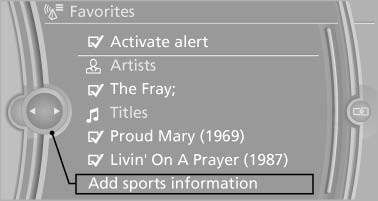
Add sports information
5. Select the league.
6. Select "Add all teams" or the desired team.
See also:
Towing other vehicles
General information
Light towing vehicle
Your vehicle must not be lighter than the
vehicle being towed; otherwise, it will not be
possible to control vehicle response.◀
Attaching the to ...
Note
Manufacturer's information for LATCH
child restraint fixing systems
To mount and use the LATCH child restraint fixing
systems, observe the operating and safety
information from the system manu ...
2008 BMW X6 Review
My wife and I had just climbed out of the X6 SUV, one of BMW's newest models,
and were walking away from it when she summed up her thoughts on its interesting
shape. "It looks like an Aztek,& ...