
Equalizer
Setting for individual audio frequency ranges.
Adjusting the equalizer
1. "CD/Multimedia", "Radio" or "Settings"
2. "Tone"
3. "Equalizer"
4. Select the desired setting.
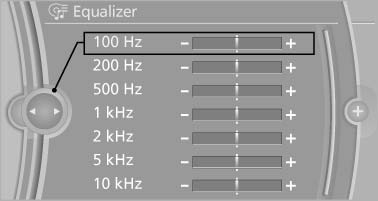
Select the desired setting
5. To adjust: turn the controller.
6. To store: press the controller.
See also:
Vehicle equipment
All standard, country-specific and optional
equipment that is offered in the model series is
described in this chapter. Therefore, equipment
is also described that is not available in a vehicle, ...
Playing music
Music searchAll tracks for which additional information has been stored can be accessed by
the music search. Tracks without additional information can be called up via the
corresponding album.
1. ...
A-Z search
1. "A-Z search"
2. "Town/City"
3. Select or enter the town/city.
4. "Category"
5. Select the category.
6. "Category details"
For some special destinations ...