
Preselecting activation times
1. "Settings"
2. "Climate"
3. "Activate Timer 1" or "Activate Timer 2"
4. "Timer 1:" or "Timer 2:"
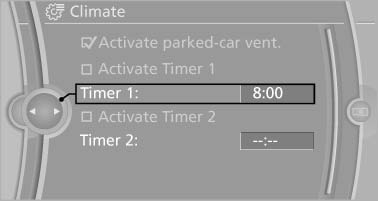
Preselecting activation times
5. Set the desired time.
 The symbol on the
automatic climate control
lights up when the switch-on time is activated.
The symbol on the
automatic climate control
lights up when the switch-on time is activated.
 The symbol on the automatic
climate control
flashes when the system has been switched on.
The symbol on the automatic
climate control
flashes when the system has been switched on.
The system will only be switched on within the next 24 hours. After that, it needs to reactivated.
See also:
Indication of a flat tire
The yellow warning lamp lights
up. A
Check Control message is displayed.
There is a flat tire or a major loss in tire
inflation pressure.
1. Reduce your speed and stop cautiously.
Avoid ...
General information
Contacts can be created and edited.
Contacts can be created and edited. The contacts
from the mobile phone are displayed as
well if this function is supported by the mobile
phone. Addresses can ...
Note
Children in the vehicle
Do not leave children unattended in the
vehicle; otherwise, they could endanger themselves
and other persons, e.g., by opening the
doors.◀ ...