
Glove compartment
Front passenger side
Opening
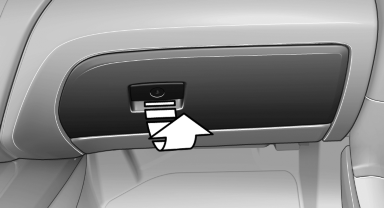
Pull the handle.
The light in the glove compartment switches on.
 Close the glove compartment again immediately
Close the glove compartment immediately after
use while driving; otherwise, injury may occur
during accidents.◄
Closing
Fold up the cover.
Locking
Lock glove compartment with an integrated key, refer to page 30.
Then the remote control device without an integrated key can be handed over, e.g. in the hotel. Access to the glove box is not possible.
USB interface for data transfer
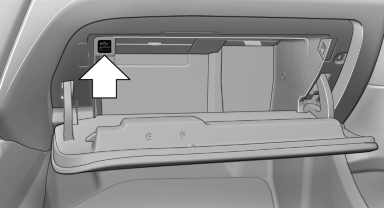
Connection for importing and exporting data on USB devices, e.g.:
► Personal Profile settings.
► Music collection.
Observe the following when connecting:
► Do not use force when plugging the connector
into the USB interface.
► Do not connect devices such as fans or
lamps to the USB interface.
► Do not connect USB hard drives.
► Do not use the USB interface to recharge
external devices.
See also:
Switching the system on/off
Switching off
At the lowest fan speed, press
the left
side of the button on the driver's side.
Switching on
Press any button. ...
Requirements
Via the Control Display, set a language that is
also supported by the voice activation system
so that the spoken commands can be identified.
Set the language. ...
Switching spoken instructions on/off
The setting is stored for the remote control currently
in use.
1. "Navigation"
2. "Map"
3. "Voice
instructions" ...