
Displays in the instrument cluster
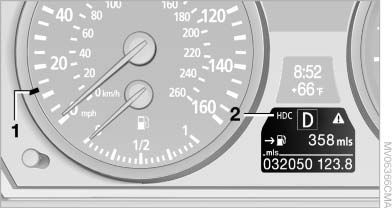
Displays in the instrument cluster
1, Display for target speed
2, HDC display
See also:
Enlarging the cargo area
The rear seat backrest is divided. You can fold
down both sides separately in order to expand
the cargo area.
BMW X6: before folding the rear seat
backrest forward
Before folding the rear se ...
The concept
The Driving Experience Switch can be used to
adjust the certain characteristics of the vehicle.
Various programs can be selected for this purpose.
The Driving Experience Switch and the
DSC OFF b ...
Selection lists in the
instrument cluster
The concept
The concept
The following can be operated using the buttons
and the thumbwheel on the steering wheel:
▷ Current audio source.
▷ Redial on telephone.
▷ Activation ...