
Units of measure
Setting the units of measure
To set the units for fuel consumption, route/distance and temperature:
1. "Settings"
2. "Language/Units"
3. Select the desired menu item.
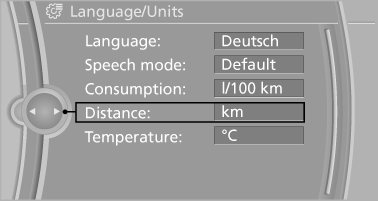
4. Select the desired unit.
The setting is stored for the remote control currently in use.
See also:
Safety
Active head restraints, two-row side curtain airbags, front airbags and
side-impact airbags for the front seats are all standard. So is an electronic
stability system, antilock brakes and traction ...
Storing a channel
1. "Radio"
2. "Satellite radio"
3. Select "All channels" or a desired category.
4. Select the desired channel.
5. Press the controller a ...
Contacts
...