
Front
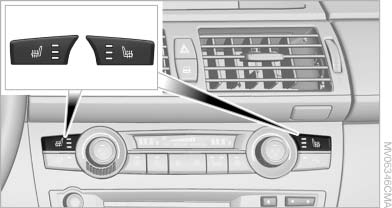
Seat heating
The temperature setting progresses one step through its control sequence each time you press the button. The maximum temperature is reached when three LEDs are lit.
To switch off: press and hold the button.
The temperature is reduced, if need be, down to no heat in order to reduce the load on the battery.
The LEDs remain lit.
See also:
Malfunction
The yellow warning lamp flashes
and
then lights up continuously. A Check
Control message is displayed. No flat
tire can be detected.
Display in the following situations:
▷ A wheel wit ...
COMFORT+
Comfort-oriented tuning of the shock absorbers
for optimal traveling comfort with maximum
driving stabilization.
Activating COMFORT+
Press the button repeatedly
until COMFORT+
appears in th ...
Radar sensors
The radar sensors are located under the rear
bumper.
The system may not be fully functional in the
following situations:
▷ Dirty or icy bumper.
▷ Stickers on the bumper.
A Check ...