
Settings
Vehicle
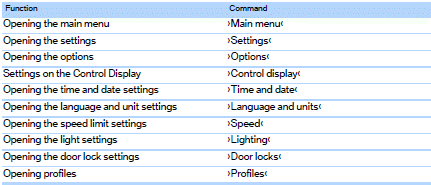

See also:
Changing batteries
Changing batteries
1. Press the detent and remove the cover.
2. Change the batteries. The type and installation
position are marked on the bottom of
the battery compartment.
3. Close the cove ...
Stored stations
General information
It is possible to store up to 40 stations.
Calling up a station
1. "Radio".
2. "Presets".
3. Select the desired station.
Storing a station
The station cu ...
Strength of the driver's and frontpassenger airbag
The strength with which the driver's and front
passenger airbags are triggered depends on the
position of the driver's and front passenger
seats.
To maintain the accuracy of this function over
...