
Service status
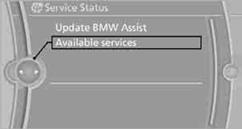
Displaying available services
Display of all services available in the vehicle.
1. "BMW Assist" or "ConnectedDrive"
2. "Service Status"
3. "Available services"
Manually updating BMW TeleServices, BMW Assist, and BMW Online.
"Update BMW Assist"
See also:
Overview, instrument cluster with enhanced features
Overview, instrument cluster with enhanced features
1 Fuel gauge
2 Speedometer
3 Indicator/warning lamps
4 Tachometer
5 Engine oil temperature
6 Current fuel consumption
7 Electronic displa ...
Cargo cover
Pull out the cargo cover, arrow 1, and hook both
sides into the brackets, arrow 2.
Hook the cargo cover on both sides
Hook the cargo cover on both sides to prevent
damaging the cover.◄
...
Displaying special destinations in the
map
To display symbols of the special destinations
in the map view:
1. "Navigation"
2. "Map"
3. Open "Options".
4. "Display Points of Interest"
5. Select the ...