
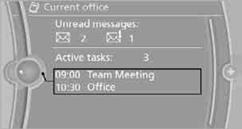
Current office
The number of unread messages and active tasks as well as upcoming appointments are displayed.
1. "Office"
2. "Current office"
3. Selecting the desired entry to display details.
See also:
Storing a channel
1. "Radio".
2. "Satellite radio".
3. If necessary, open "All channels" or the desired
category.
4. Select the desired channel.
5. Press the controller again.
6. Pr ...
NORMAL
For a balanced tuning with maximum driving stabilization.
Activating NORMAL
Press the button repeatedly until
the
program display in the tachometer
goes out.
In certain situations, the syste ...
Using contact data
At a glance
Contact data from appointments, tasks, text
messages, emails and notes can be stored or
selected.
Displaying contact or selecting phone
number
1. "Use contact data"
2. Di ...