
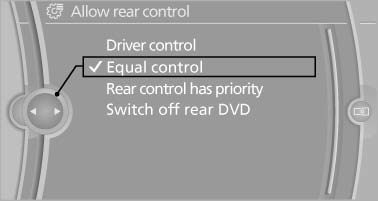
Enabling operation in the rear
Only possible via the iDrive in the front.
1. "Settings"
2. "Allow rear control"
3. Select the desired priority.
See also:
Adjusting the volume
Turn the knob until the desired volume is selected.
The setting is stored for the remote control
currently in use. ...
Transmission positions
D Drive, automatic position
Position for normal vehicle operation. All forward
gears are available.
Under normal operating conditions, fuel consumption
is lowest when you are driving in position ...
New remote controls
You can obtain new remote controls from your
service center.
Loss of the remote controls
Lost remote controls can be blocked by your
service center.
Emergency detection of remote control
It is p ...