
Storing a channel
1. "Radio"
2. "Satellite radio"
3. If necessary, open "All channels" or the desired
category.
4. Select the desired channel.
5. Press the controller again.
6. Press the controller again to confirm the
highlighted channel.
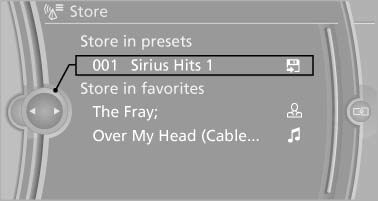
7. Select the desired memory location.
The channels are stored for the remote control currently in use.
The channels can also be stored on the programmable memory buttons.
See also:
Automatic Service Request
The TeleService data necessary for servicing
the vehicle are automatically sent to your service
partner prior to the service deadline. If possible,
the service partner will contact you and a ser ...
With the Professional navigationsystem: map view for split screen
The map view can be selected for the split
screen independently from the main screen.
1. Open "Options".
2. "Split screen"
3. Move the controller to the right repeatedly
until ...
Traffic bulletins on the map
"Traffic conditions/gray map" Active: indication
on the control display is switched to shades of
gray. This enables a better view of the traffic
bulletins. The day/night mode is disreg ...