
Climate control operation on the headliner
Temperature

Turn the wheel to set the desired temperature.
Air volume
 Press the left or right side of
the button:
decrease or increase air volume.
Press the left or right side of
the button:
decrease or increase air volume.
LEDs indicate the intensity of the air supply.
The air volume may be reduced automatically to save battery power.
Ventilation
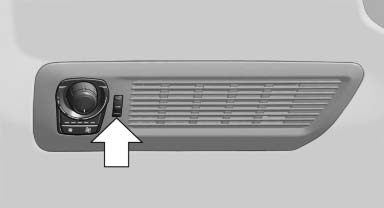
Thumbwheel for changing the air flow direction, arrow.
See also:
Roadside Assistance
At a glance
BMW Roadside Assistance can be contacted if
assistance is needed in the event of a breakdown.
Roadside Assistance can also be contacted via
a Check Control message.
Start Roadside A ...
Initializing
In rare cases, it may become necessary to initialize
the Integral Active Steering.
The warning lamp lights up. A Check
Control message is displayed.
1. With the engine running, turn the steeri ...
Drive away without delay
Do not wait for the engine to warm up while the
vehicle remains stationary. Start driving right
away, but at moderate engine speeds.
This is the fastest way for the cold engine to
reach its ope ...