
Operating the programs
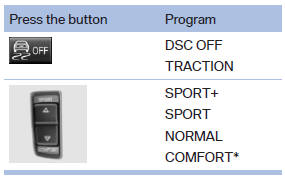
For Dynamic Damper Control*, the lower button is labeled with COMFORT.
Automatic program change
The system automatically switches to NORMAL in the following situations:
- Failure of Integral Active Steering*.
- Failure of Dynamic Damping Control*.
- The vehicle has a flat tire.
See also:
Roadside Assistance
Service availability
Roadside Assistance can be reached around the
clock in many countries. You can obtain assistance
there in the event of a vehicle breakdown.
Roadside Assistance
The Roadside ...
Changing the map section
"Interactive map"
▷ To shift the map: move the controller in the
required direction.
▷ To shift the map diagonally: move the controller
in the required direction and turn ...
Damage to safety belts
In the case of strain caused by accidents or
damage:
Have the safety belts, including the safety belt
tensioners, replaced and have the belt anchors
checked.
Checking and replacing safety
b ...