
Malfunction of the automatic deactivation system
When transporting older children and adults, the front passenger airbags may be deactivated in certain sitting positions. In this case, the indicator lamp for the front passenger airbags lights up.
In this case, change the sitting position so that the front passenger airbags are activated and the indicator lamp goes out.
If it is not possible to activate the airbags, have the person sit in the rear.
To make sure that the occupied seat cushion can be evaluated correctly
- Do not attach covers, cushions, ball mats or other items to the front passenger seat unless they are specifically recommended by the manufacturer of your vehicle.
- Do not place any objects on the front passenger seat.
- Do not place objects under the seat that could press against the seat from below.
Indicator lamp for the front passenger airbags
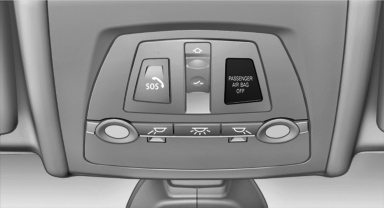
The indicator lamp for the front passenger airbags indicates the operating state of the front passenger airbags.
The lamp indicates whether the airbags are activated or deactivated.
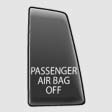
- The indicator lamp lights up when a child who is properly seated in a child restraint fixing system intended for that purpose is detected on the seat or the seat is empty. The airbags on the front passenger side are not activated.
- The indicator lamp does not light up when, for example, a correctly seated person of sufficient size is detected on the seat. The airbags on the front passenger side are activated.
The system generally detects children seated in a child seat, especially in the child seats that were required by NHTSA when the vehicle was manufactured. After installing a child seat, make sure that the indicator lamp for the front passenger airbags lights up. This indicates that the child seat has been detected and the front passenger airbags are not activated.
See also:
Continuing destination guidance
If the destination was not reached during the last
trip, destination guidance can be resumed.
"Resume guidance" ...
Tool kit
Tool kit
The tool kit is stowed under the cargo floor panel
in the cargo area. ...
With the Professional navigationsystem: map view for split screen
The map view can be selected for the split
screen independently from the main screen.
1. Open "Options".
2. "Split screen"
3. Move the controller to the right repeatedly
until ...