
Detailed information on service requirements
More information on the scope of service required can be displayed on the Control Display.
1. "Vehicle Info"
2. "Vehicle status"
3.  "Service required"
Required maintenance procedures and legally mandated inspections are displayed.
4. Select an entry to call up detailed information.
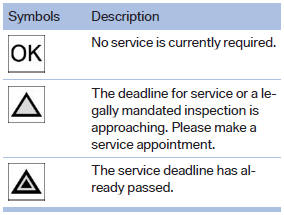
Symbols
See also:
The concept
The iDrive combines the functions of a multitude
of switches. Thus, these functions can be operated
from a central location.
Using the iDrive during a trip
To avoid becoming distracted and po ...
Continuing destination guidance
If the destination was not reached during the last
trip, destination guidance can be resumed.
"Resume guidance" ...
Status indicator on the Control DisplayThe status is displayed.
The tire and system status is indicated by the
color of the tires.
A change in the tire inflation pressure during
driving is taken into account.
A correction is only necessary if this is indicat ...