
Units of measure
Setting the units of measure
To set the units for fuel consumption, route/distance and temperature:
1. "Settings"
2. "Language/Units"
3. Select the desired menu item.
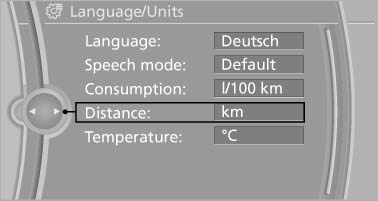
4. Select the desired unit.
The setting is stored for the remote control currently in use.
See also:
Three different drive modes
There are three different modes that the transmission works under: Drive,
Sport or Manual. Sport mode provides a more aggressive shifting, holding gears
longer and letting you stay in the engine's ...
Vehicle Overview
The X6, one of BMW's recent forays into SUV territory, is a tallish fastback
that the company calls a sports activity coupe. With seating for four, it's
basically a midsize SUV with four doors, ex ...
Adjusting the volume
Turn the volume button while giving an instruction
until the desired volume is set.
▷ The volume remains constant even if the
volume of other audio sources is changed.
▷ The volume i ...