
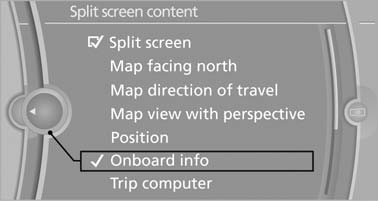
Selecting the display
1.  Press the button.
2. "Split screen"
3. Move the controller until the split screen is selected.
4. Press the controller or select "Split screen content".
5. Select the desired menu item.
See also:
Activating assistance functions
Several assistance functions can be active at the
same time.
Showing the parking aid lines
"Parking aid lines"
Pathway and turning lines are displayed.
Showing the obstacle marking
...
Warning of people in danger
If the system detects a person in the defined
area in front of the vehicle and if there is the danger
of a collision with this person, a warning
symbol appears in the Control Display and
Hea ...
Notes
Shatter-proof containers and no hot
drinks
Use light and shatter-proof containers and do
not transport hot drinks. Otherwise, there is the
increased danger of injury in an accident.◀
...