
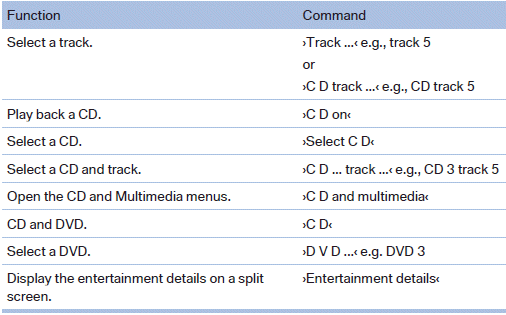
CD/Multimedia
CD/DVD drive
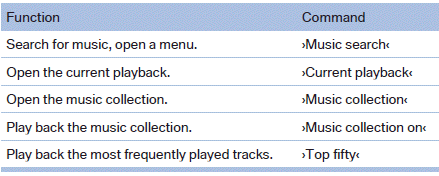
Music collection
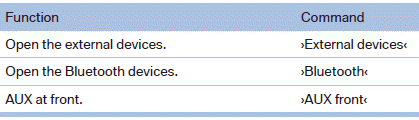
External devices
Tone

See also:
Hazard warning flashers
Hazard warning flashers
The button for the hazard warning system is located
on the center console. ...
Automatic deactivation
In certain situations, the Automatic Engine Start/
Stop Function is deactivated automatically for
safety reasons, such as when the driver is detected
to be absent
Malfunction
The automatic eng ...
Changing the scale
1. Select the symbol.
2. To change the scale: turn the controller.
Automatically scaled map scale
In the map view facing north, turn the controller
in any direction until the AUTO scale is displ ...