
Display
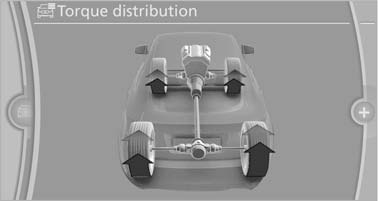
The Control Display shows how xDrive and Dynamic Performance Control are distributing the drive forces.
1. "Vehicle Info"
2. "Torque distribution"
Torque distribution
The current distribution of drive forces is indicated by arrows pointing to all four wheels.
The highlighted arrows show the drive forces currently present. The longer an arrow is, the greater the drive forces in the associated wheel.
The transparent arrows indicate the maximum value the drive forces over the last 10 seconds.
Malfunction
Malfunctions are displayed via Check Control
See also:
Setting
Pull the switch.
The LED lights up.
The indicator lamp lights up red.
The
parking brake is set.
Lower lamp: indicator lamp in
Canadian
models
Set the parking brake and further secure
...
Opening
1. Briefly press the rear edge of the fuel filler
flap.
Opening
2. Turn the fuel cap counterclockwise.
3. Place the fuel cap in the bracket attached to
the fuel filler flap. ...
Dynamic options: M Sport package, Adaptive M Sport suspension, sports
automatic transmission and BMW 3-Series xDrive
Enthusiasts will welcome the further features that are available to enhance
the dynamic driving qualities of the new BMW 3-Series and give them a
distinctive visual dimension as well. The M Sport ...