
Removing and inserting
Cargo cover without partition net:
Removing
The cover can be removed to load bulky luggage.
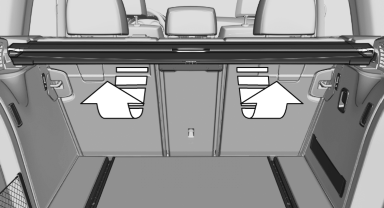
Reach under the cover and turn it upward, arrows.
Pull the cover back horizontally.
Cargo cover with partition net:
Removing
The cover can be removed to load bulky luggage.
1. Press the button, arrow 1, to unlock the cover.
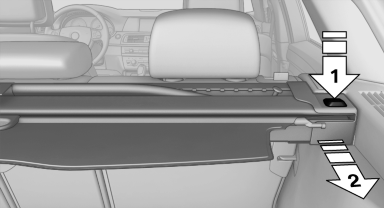
2. Pull the cover back, arrow 2.
Installing
Slide the cover forward horizontally into the two side brackets until it audibly latches.
The red warning fields disappear in the case of a cover with partition net.
Tug on the cover to check if it is properly locked in place.
See also:
Unlocking and opening
▷ Either unlock the doors together using the
button for the central locking system and
then pull the door handle above the armrest
or
▷ Pull the door opener twice individually on
...
Malfunction
The yellow warning lamp flashes and
then lights up continuously. A Check
Control message is displayed. No flat
tire can be detected.
Display in the following situations:
A wheel without T ...
The concept
The vehicle alarm system responds to:
Opening of a door, the hood or the trunk lid.
Movements in the vehicle: interior motion
sensor.
Changes in the vehicle tilt, e.g., during attempts
t ...