
Calling up information on the infodisplay
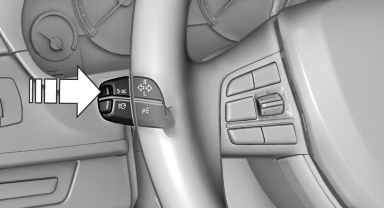
Press the onboard computer button on the turn signal lever.
Information is displayed on the info display of the instrument cluster.
See also:
Starting aid terminals
Connecting order
Connect the jumper cables in the correct
order; otherwise, there is the danger of injury
from sparking.
The so-called starting aid terminal in the engine
compartment acts a ...
Vehicle equipment
All standard, country-specific and optional
equipment that is offered in the model series is
described in this chapter. Therefore, equipment
is also described that is not available in a vehicle, ...
For 520i and 528i: Check oil
level
The concept
The oil level is monitored electronically during
driving and shown on the Control Display.
If the oil level reaches the minimum level, a
check control message is displayed.
Displayi ...