
Activating/deactivating the systemmanually
Using the button
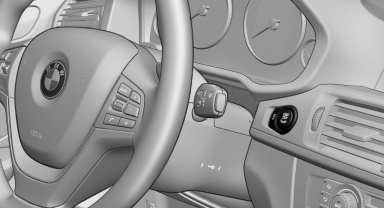
 Press the button.
► LED comes on: Auto Start Stop function is deactivated.
The engine is started during an automatic engine stop.
The engine can only be stopped or started via the Start/Stop button.
► LED goes out: Auto Start Stop function is activated.
Switching off the vehicle during an automatic engine stop
During an automatic engine stop, the vehicle can be switched off permanently, e.g., when leaving it.
1. Press the Start/Stop button. The ignition is switched off. The Auto Start/Stop function is deactivated.
Automatic transmission: the transmission position P is engaged automatically.
2. Set the parking brake.
Engine start as usual via Start/Stop button.
See also:
Using contact data
At a glance
Contact data from appointments, tasks, text
messages, emails and notes can be stored or
selected.
Displaying contact or selecting phone
number
1. "Use contact data".
2. ...
Overview, instrument cluster
Overview, instrument cluster
1 Fuel gauge
2 Speedometer
3 Indicator/warning lamps
4 Tachometer
5 Engine oil temperature
6 Current fuel consumption
7 Electronic displays
8 Display/reset mil ...
Using the door lock
General information
Locking from the outside
Do not lock the vehicle from the outside if
there are people in it, as the vehicle cannot be
unlocked from inside without special knowledge.◀ ...