
Buttons on the remote control
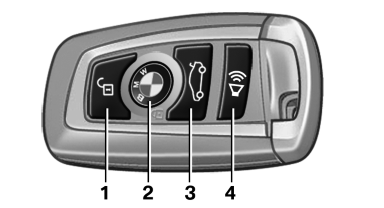
1 Unlocking
2 Locking
3 Opening the tailgate
4 Panic mode, headlamp courtesy delay feature
See also:
Selecting the contact as a navigation
destination
1. Select the desired contact.
2. Select the address.
3. "Start guidance" or "Add as another
destination" ...
Configuring the prewarning
After the warning function is switched on, the
following can be set via the iDrive:
▷ The prewarning can be switched on/off.
▷ The time of the prewarning can be set.
These settings ha ...
Unlocking and opening
► Either unlock the doors together using the
button for the central locking system and
then pull the door handle above the armrest
or
► Pull the door opener twice individually on
each ...