
Vehicle information
Owner's Manual
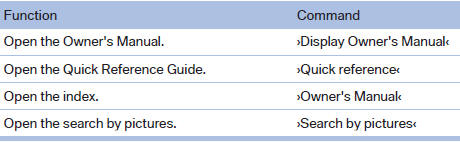
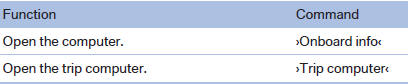
Computer
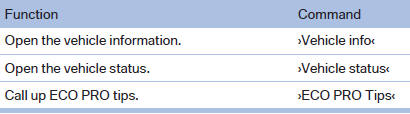
Vehicle

See also:
Manually unlocking fuel filler flap
In the event of a malfunction, the fuel filler flap
can be released manually:
1. Open the right-hand side panel in the cargo
area.
2. Pull the knob with the gas pump symbol.
Manually unlockin ...
Vehicle equipment
All standard, country-specific and optional
equipment that is offered in the model series is
described in this chapter. Therefore, equipment
is also described that is not available in a vehicle, ...
Socket for OBD Onboard Diagnosis
Position
There is an OBD socket on the driver's side for
checking the primary components in the vehicle
emissions.
Emissions
▷ The warning lamp lights up:
Emissions are deteriorating ...