
Entering a phone number
Dialing a number
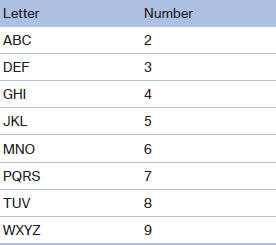
When entering phone numbers, you can switch between entering letters and numbers.
Service numbers can be entered more easily, e. g. 1-888-BMW-CARD.
1. "Telephone"
2. "Dial number"
3. Select the digits individually.
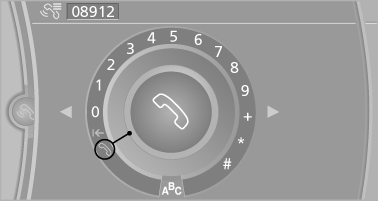
4. Convert to letters as required.
 Select the symbol.
Select the letters individually.
5.  Select the symbol.
 Select symbol to convert to
numbers.
Select symbol to convert to
numbers.
The phone number can also be entered by voice.
Only numbers can be spoken.
Letter/number assignment
See also:
Safety
The xDrive50i has upgraded brakes with aluminum calipers. BMW's Integrated
Chassis Management coordinates the Dynamic Performance Control differential with
stability and traction control systems t ...
Vehicle equipment
All standard, country-specific and optional
equipment that is offered in the model series is
described in this chapter. Therefore, equipment
is also described that is not available in a vehicle, ...
General information
The cargo area can be enlarged by folding down
the rear seat backrest.
The rear seat backrest is divided at a ratio of 40–
20–40.
Danger of pinching
Before folding down the rear seat backrests ...