
Managing music
Albums
Renaming an album
The name of the album, if available, is automatically entered when the album is stored. If the name is not available, it can be changed later if desired.
1. "CD/Multimedia"
2. "Music collection"
3. Highlight the desired album.
4. Open "Options".
5. "Rename album"
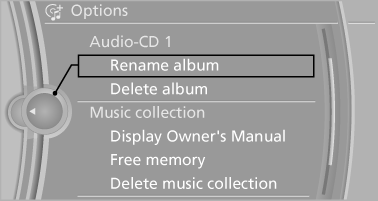
6. Select the letters individually.
Deleting an album
An album cannot be deleted while a track from that album is being played.
1. "CD/Multimedia"
2. "Music collection"
3. Highlight the desired album.
4. Open "Options".
5. "Delete album"
Deleting a track and directory
A track cannot be deleted while it is being played.
A directory cannot be deleted while a track from that directory is being played.
1. "CD/Multimedia"
2. "Music collection"
3. Highlight the directory or track.
4. Open "Options".
5. "Delete folder" or "Delete track"
Free memory capacity
Display the free memory capacity in the music collection.
1. "CD/Multimedia"
2. "Music collection"
3. Open "Options".
4. "Free memory"
Music collection
Backing up the music collection
The entire music collection can be stored on a USB device. Make sure there is enough free memory capacity on the USB device.
Depending on the number of tracks, backing up the music collection may take several hours.
Therefore, it is best to perform the backup during a long trip.
1. Starting the engine.
2. Connect the USB device to the USB interface
in the glove compartment.
3. "CD/Multimedia"
4. "Music collection"
5. Open "Options".
6. "Music data import/export"
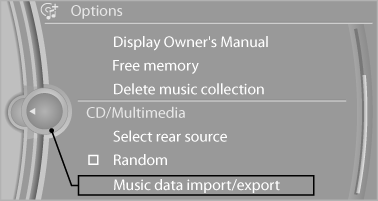
7. "Backup music on USB"
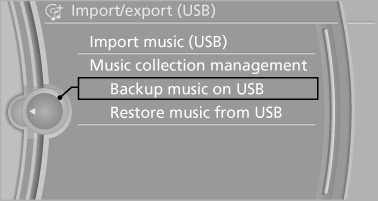
Storing the music collection in the vehicle
When storing from the USB device, the existing music collection in the vehicle is replaced.
1. "CD/Multimedia"
2. "Music collection"
3. Open "Options".
4. "Music data import/export"
5. "Restore music from USB"
Deleting the music collection
1. "CD/Multimedia"
2. "Music collection"
3. Open "Options".
4. "Delete music collection"
See also:
First aid kit
The first aid kit is located in the container on the
inside of the trunk lid.
Unscrew the wing nut to open.
Some of the articles have a limited service life.
Check the expiration dates of the c ...
Settings for the map view
The settings are stored for the remote control
currently in use.
1. "Navigation"
2. "Map"
3. Open "Options".
4. "Settings"
Set the map view.
► &q ...
Child restraint fixing system with a
tether strap
LATCH mounting eyes
Only use the mounting eyes for the upper
LATCH retaining strap to secure child restraint
fixing systems; otherwise, the mounting eyes
could be damaged.
Mounting points
...