
Playback
Loading the CD/DVD player
Insert the CD/DVD with the printed side up.
Playback begins automatically.
Reading can take a few minutes with compressed audio files.
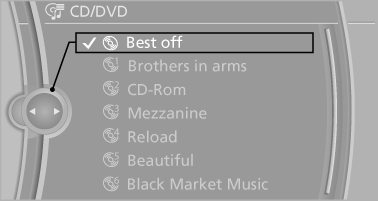
Starting playback
A CD/DVD is located in the CD/DVD player or DVD changer.
1. "CD/Multimedia"
2. "CD/DVD"
3. Select the desired CD or DVD.
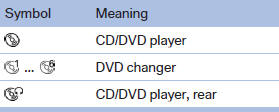
Playable formats
▷ DVD: DVD-ROM, DVD-R, DVD+R, DVDRW,
DVD+RW, DVD-R DL, DVD+R DL, DVD
audio (video part only), DVD video.
▷ CD: CD-ROM, CD-R, CD-RW, CD-DA, VCD,
SVCD.
▷ Compressed audio files: MP3, WMA, AAC,
M4A.
CD/DVD removal
1.  Press the button.
The CD/DVD is partially ejected.
2. Remove the CD/DVD.
See also:
Vehicle equipment
All standard, country-specific and optional
equipment that is offered in the model series is
described in this chapter. Therefore, equipment
is also described that is not available in a vehicle, ...
Opening the traffic bulletins
1. "Navigation"
2. "Map"
3. "Traffic Info"
First the traffic bulletins for the calculated
route are displayed. The traffic bulletins are
sorted by their distance fr ...
AM/FM station
Selecting a station
1. "Radio"
2. "FM" or "AM"
3. Select the desired station
All saved stations are stored for the remote control
currently in use.
Changing the ...