
Buttons at a glance
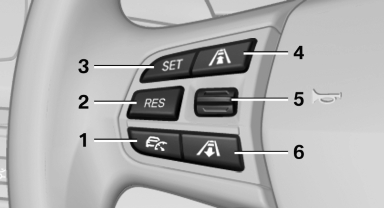
1. System on/off, interrupt
2. Resume speed
3. Store speed
4. Reduce distance
5. Store, maintain/change speed
6. Increase distance
See also:
Stored stations
General information
It is possible to store up to 40 stations.
Calling up a station
1. "Radio"
2. "Presets"
3. Select the desired station.
Storing a station
The station curr ...
Turn signal, high beams,
headlamp flasher
Turn signal
Using turn signals
Press the lever beyond the resistance point.
To switch off manually, press the lever to the resistance
point.
Unusually rapid flashing of the indicator lamp indi ...
Controls on the interior rearview mirror
► LED, arrow 1.
► Buttons, arrow 2.
► The hand-held transmitter, arrow 3, is required
for programming. ...