
Increasing or decreasing vehicle speed
Specify desired speed in the range from approx.
4 mph/6 km/h to approx. 15 mph/25 km/h using the rocker switch of the cruise control on the steering wheel. Vehicle speed can be changed by lightly accelerating.
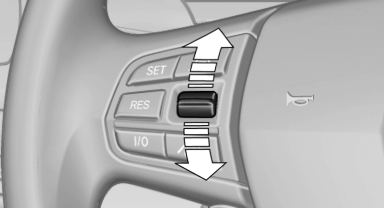
Increasing or decreasing vehicle speed
▷ Press up the rocker switch to the point of resistance: the speed increases gradually.
▷ Press up the rocker switch past the point of resistance: the speed increases while the rocker switch is pressed.
▷ Press down the rocker switch to the point of resistance: the speed decreases gradually.
▷ Press down the rocker switch past the point of resistance: when driving forward, the speed decreases to approx. 6 mph/10 km/h; when reversing, the speed decreases to approx.
4 mph/6 km/h.
See also:
Suitable media
Use of CDs/DVDs
▷ Do not use self-recorded CDs/DVDs
with labels applied, as these can become
detached during playback due
to heat buildup and can cause irreparable
damage to the devic ...
Stored stations
General information
It is possible to store up to 40 stations.
Calling up a station
1. "Radio"
2. "Presets"
3. Select the desired station.
Storing a station
The station curr ...
Display
Language on the Control DisplaySetting the language
1. "Settings"
2. "Language/Units"
3. "Language:"
4. Select the desired language.
The se ...