
Hiding Check Control messages
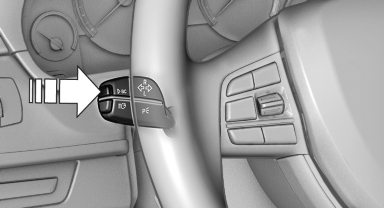
Hiding Check Control messages
Press the computer button on the turn signal lever.
▷ Some Check Control messages are displayed continuously and are not cleared until the malfunction is eliminated. If several malfunctions occur at once, the messages are displayed consecutively.
These messages can be hidden for approx.
8 seconds. After this time, they are displayed
again automatically.
▷ Other Check Control messages are hidden
automatically after approx. 20 seconds.
They are stored and can be displayed again later.
See also:
Engine compartment
Vehicle equipment
All standard, country-specific and optional
equipment that is offered in the model series is
described in this chapter. Therefore, equipment
is also described that is not avai ...
Displaying stored Check Control messages
1. "Vehicle Info"
2. "Vehicle status"
3. "Check Control"
4. Select the text message. ...
The M Formula
Following the M car formula, the 1M features increased power, a manual
transmission, rear-wheel drive, a modified suspension, fat tires and a
distinctive look — perhaps more distinctive than the o ...