
Replacing the battery
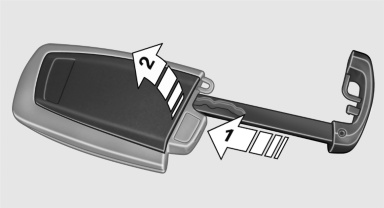
Replacing the battery
1. Take the integrated key out of the remote
control.
2. Push in the catch with the key, arrow 1.
3. Remove the cover of the battery compartment;
see arrow 2.
4. Insert a battery of the same type with the
positive side facing upwards.
5. Press the cover closed.
 Take the used
battery to a recycling center
or to your service center.
Take the used
battery to a recycling center
or to your service center.
See also:
Requirements
▷ The mobile phone is suitable.
▷ The mobile phone is ready for operation.
▷ Bluetooth is activated in the vehicle, and on the mobile phone.
▷ Bluetooth presettings may need ...
Switching the warning function on/off
Press the button
▷ On: the LED lights up.
▷ Off: the LED goes out.
The state is stored for the remote control currently
in use. ...
Transmission positions
D Drive, automatic position
Position for normal vehicle operation. All forward
gears are available.
R is Reverse
Select only when the vehicle is stationary.
N is Neutral
Use in automatic car was ...