
Integrated key
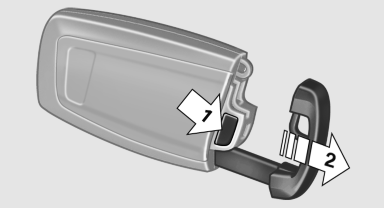
Integrated key
Press the button on the back of the remote control, arrow 1, and pull out the key, arrow 2.
The integrated key fits the following locks:
▷ Driver's door.
▷ Storage compartment in the front center
armrest.
The storage compartment contains a switch for separately securing the trunk lid
See also:
General information
Overloading the vehicle
To avoid exceeding the approved carrying
capacity of the tires, never overload the vehicle.
Overloading can lead to overheating and increases
the rate at which damage deve ...
Using voice activation
Activating the voice activation system
1. Press the button on the
steering
wheel.
2. Wait for the signal.
3. Say the command.
The command is displayed in the instrument
cluster.
This symb ...
Weights
The values preceding the slash apply to vehicles
with manual transmission; the values following
the slash apply to vehicles with automatic transmission.
...