
Buttons on the remote control
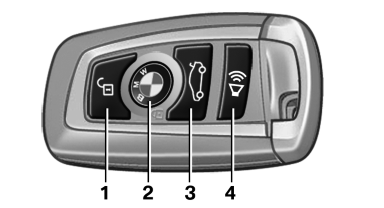
Buttons on the remote control
1. Unlocking
2. Locking
3. Trunk lid
4. Panic mode, headlamp courtesy delay feature
See also:
2011 BMW 1 Series M Review by Joe Wiesenfelder
Based on the BMW 1 Series, the 1 Series M takes its place among M performance
versions of the 3, 5 and 6 Series cars and the X5 and X6 SUVs. Though the name
"M1" seems a natural, BMW use ...
Variable sport steering
The variable sport steering increases the steering
angle of the front wheels at large steering
wheel angles, e.g., in tight curves or when parking.
Steering becomes more direct.
It also varies t ...
Status information
Status boxThe status box at the top right displays the following information:
> Time
> Current entertainment source
> Sound output ON/OFF
> Mobile phone network with strongest receptio ...