
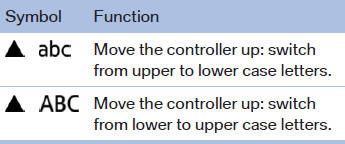
Switching between upper and lower case letters
Depending on the menu, you can switch between entering upper and lower case letters:
See also:
Roadside Assistance
BMW Roadside Assistance is available by phone around the clock in many countries.
You can obtain support there in the event of a breakdown. ...
Information at a glance
Info display
Repeatedly pressing the button
on the turn signal lever calls up
the following information on the
info display:
► Range.
► ECO PRO bonus range.
► Average fuel co ...
Adjusting the height: manual head
restraints
Adjusting the height: manual head
restraints
▷ To raise: pull.
▷ To lower: press the button, arrow 1, and
push the head restraint down. ...