
CD/Multimedia
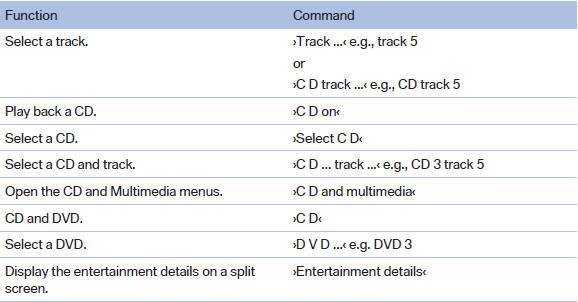
CD/DVD drive
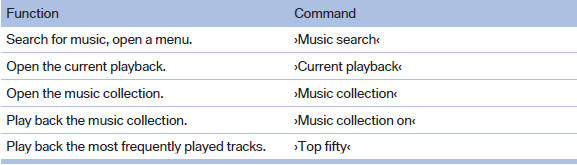
Music collection
External devices

Tone

See also:
System limits
Personal responsibility
The high-beam assistant cannot serve as
a substitute for the driver's personal judgment
of when to use the high beams. Therefore, manually
switch off the high beams in ...
Displays in instrument cluster
Displays in instrument cluster
1 Stored desired speed
▷ Green: the system is active.
▷ Orange: the system is interrupted.
2 Lights up yellow: vehicle detected ahead
Display also ...
Malfunction
A message is displayed.
Adaptive light control is malfunctioning or has
failed. Have the system checked as soon as possible. ...