
Navigation
General information
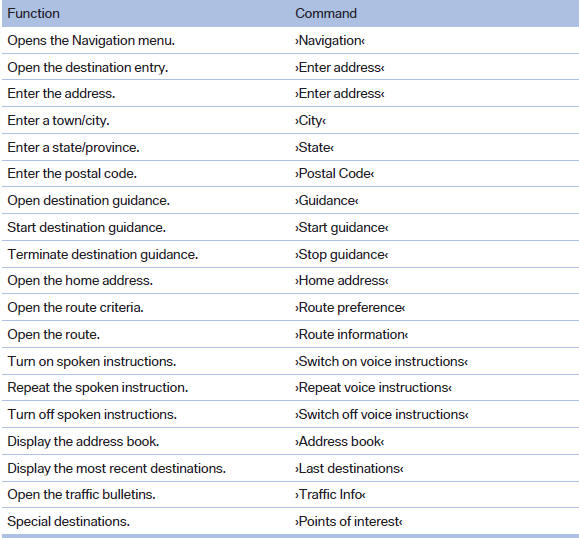
Map

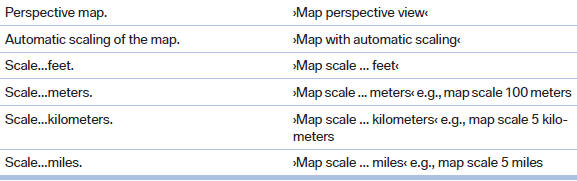
Split screen settings
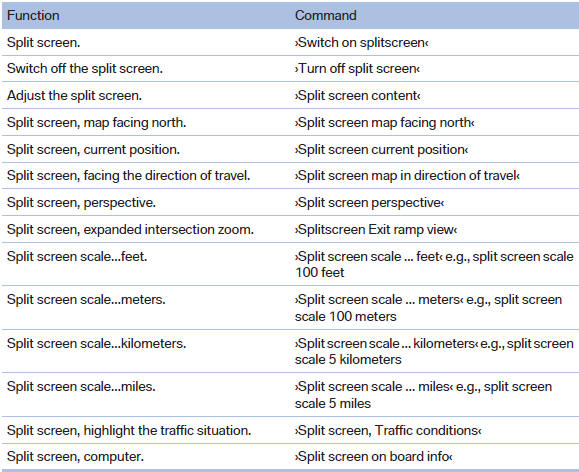

Destination guidance with intermediate destinations

See also:
General information
Refuel promptly
Refuel no later than at a range of 30 miles/50 km, or operation of the engine is
not ensured and damage may occur.◄ ...
Switch off the engine during longer stops
Switch off the engine during longer stops, e.g.,
at traffic lights, railroad crossings or in traffic
congestion.
Fuel savings are achieved after the vehicle is
switched off for only approx. 4 s ...
Navigation
General information
Map
Split screen settings
Destination guidance with intermediate destinations
...