
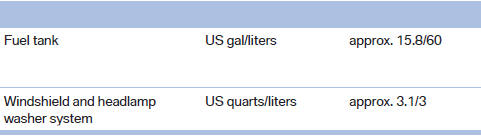
Capacities
See also:
Following the initial pairing
▷ The mobile phone is detected/connected in
the vehicle within a short period of time
when the engine is running or the ignition is
switched on.
▷ The phone book entries of the tele ...
Controls
This chapter is intended to provide you with
information that will give you complete control of
your vehicle. All features and accessories that are
useful for driving and your safety, comfort and
...
Visual warning
The approach to an object can be shown on the
Control Display. Objects that are farther away
are displayed on the Control Display before a
signal tone sounds.
Visual warning
The display appe ...