
Entering a phone number
Dialing a number
When entering phone numbers, you can switch between entering letters and numbers.
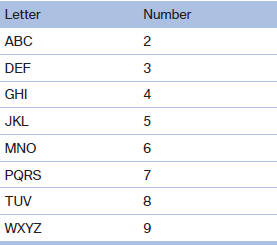
Service numbers can be entered more easily, e. g. 1-888-BMW-CARD.
1. "Telephone".
2. "Dial number".
3. Select the digits individually.
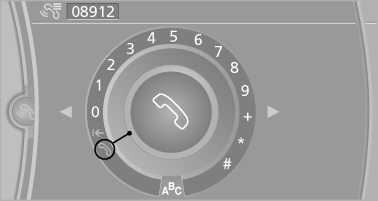
4. Convert to letters as required.
 Select the symbol.
Select the letters individually.
5.  Select the symbol.
 Select symbol to convert to
numbers.
Select symbol to convert to
numbers.
Phone numbers can also be entered by voice.
Only numbers can be spoken.
Letter/number assignment
See also:
Parking lamps
Switch position :
the vehicle lamps light
up on all sides, e.g., for parking.
Do not use the parking lamps for extended periods;
otherwise, the battery may become discharged
and it would the ...
System limits
Sudden tire damage
Sudden serious tire damage caused by
external influences cannot be indicated in advance.
◀
The system does not operate correctly if it has
not been reset. For exampl ...
Unlocking and opening
▷ Either unlock the doors together using the
button for the central locking system and
then pull the door handle above the armrest
or
▷ Pull the door opener twice individually on
...