
Playback
Loading the CD/DVD player
Insert the CD/DVD with the printed side up.
Playback begins automatically.
Reading can take a few minutes with compressed audio files.
Starting playback
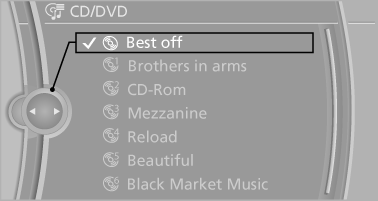
A CD/DVD is located in the CD/DVD player or DVD changer.
1. "CD/Multimedia".
2. "CD/DVD".
3. Select the desired CD or DVD.
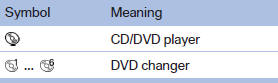
Playable formats
▷ DVD: DVD-ROM, DVD-R, DVD+R, DVDRW, DVD+RW, DVD-R DL, DVD+R DL, DVD audio (video part only), DVD video.
▷ CD: CD-ROM, CD-R, CD-RW, CD-DA, VCD, SVCD.
▷ Compressed audio files: MP3, WMA, AAC, M4A.
CD/DVD removal
1.  Press the button.
The CD/DVD is partially ejected.
2. Remove the CD/DVD.
See also:
Manually adjustable seats
At a glance
1 Forward/backward
2 Thigh support
3 Seat tilt
4 Backrest width
5 Lumbar support
6 Height
7 Backrest tilt
Forward/backward
Forward/backward
Pull the lever and slide the seat ...
Emergency Request
Requirements
► Equipment version with full preparation
package mobile phone.
An Emergency Request can be made, even
if no mobile phones are paired with the vehicle.
► BMW Assist i ...
Switching on/off manually
Switching on/off manually
Press the button.
▷ On: the LED lights up.
▷ Off: the LED goes out. ...