
Controls
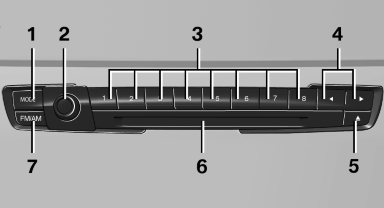
1 Change entertainment sources
2 Volume, on/off
3 Programmable memory buttons or radio station buttons
4 Change station/track
5 Eject CD/DVD
6 CD/DVD drive
7 Change wave band
See also:
Interior rearview mirror
Reducing the blinding effect
Reducing the blinding effect
From behind when driving at night: turn the
knob. ...
Entering a destination manually
To make it easier to enter town/city names and street names, the system assists
you with automatic name completion and entry comparison. This makes it possible
to enter different spellings and com ...
Parking lamps/low beams,headlamp control
General information
Switch position: 0, ,
If the driver door is opened with the ignition
switched off, the exterior lighting is automatically
switched off at these switch settings.
Parking lamps
...